How To: MIDI Out 🎹

Hey! We’ve gotten a few questions about how MIDI Out works in the new 1.0.1 Notes update so I put together a little video clip to show you.

  1. Go to Settings > Note Settings and turn on Output transformer MIDI
  2. Record what you want
  3. Go to the track that you want to route the MIDI to
  4. Select Notes as the input
  5. Hit Record
1 Like

Does not work in Logic Pro. An I guess it should work directly from the NOTES when it has the Transformer MIDI out. what do you think?

This is the thing…people are asking for midi out, but the only place I’ve seen it work is in Ableton with the VST.
Here’s a discussion on KVR if your up for a deep dive.

The use case they discuss is getting the arp from Pigments to output midi to another channel…

https://www.kvraudio.com/forum/viewtopic.php?t=591011&sid=3cf864a1e71e0bf97b32c75275a4948c&start=15

Using the AI ​​Chord feature beyond basic MIDI routing is incredibly exciting, as it allows each key to have its own path. Play a chord on your main synth and watch as each note triggers different instruments, creating a complex, evolving atmosphere. And the best part? Real-time flexibility. You can turn these “shadow instruments” on or off during a live performance, allowing you to simplify your sound or create a powerful wall of sound with the touch of a button.

What are you using there @RawBBQ and when you say “AI Chord” is this something in Notes?

(I tried zooming into the pic but the resolution is too low to read properly…)

1 Like

I use Fluid Chords 2 to transfer chords to other synths, but it doesn’t always sound the way I want it to because these chords are tailored to the functions of Fluid Chords 2, and its chords can only be supplemented with a couple of pads from other synths, creating some layering. I also found some Notes synthesizer sounds and tried loading them onto the CR8 sampler and playing them as chords, but I didn’t get the desired result. Your synthesizer obviously has a good layering algorithm, and it also has great chords. The artificial intelligence, understanding the structure of this synthesizer, produces cool sounds.

It might be me, but I dn’t thnk midiout is working in Presonus studio one.
I can get it working for other apps.
I believe it is COMMON to put a MIDI recorder in ones app and create a MIDI file to drag in. From what I understand, this is less frought, as I believe Steinberg SDK has some odd ideas about how a live midi out should work.

1 Like

Yeah, that’s also an idea. We put an audio recorder in SubLab and XL and you could drag out the 808 sound you played….I’ll put in the feature list. Its all about making Notes super useful and we’re up for doing anything towards that goal.

1 Like

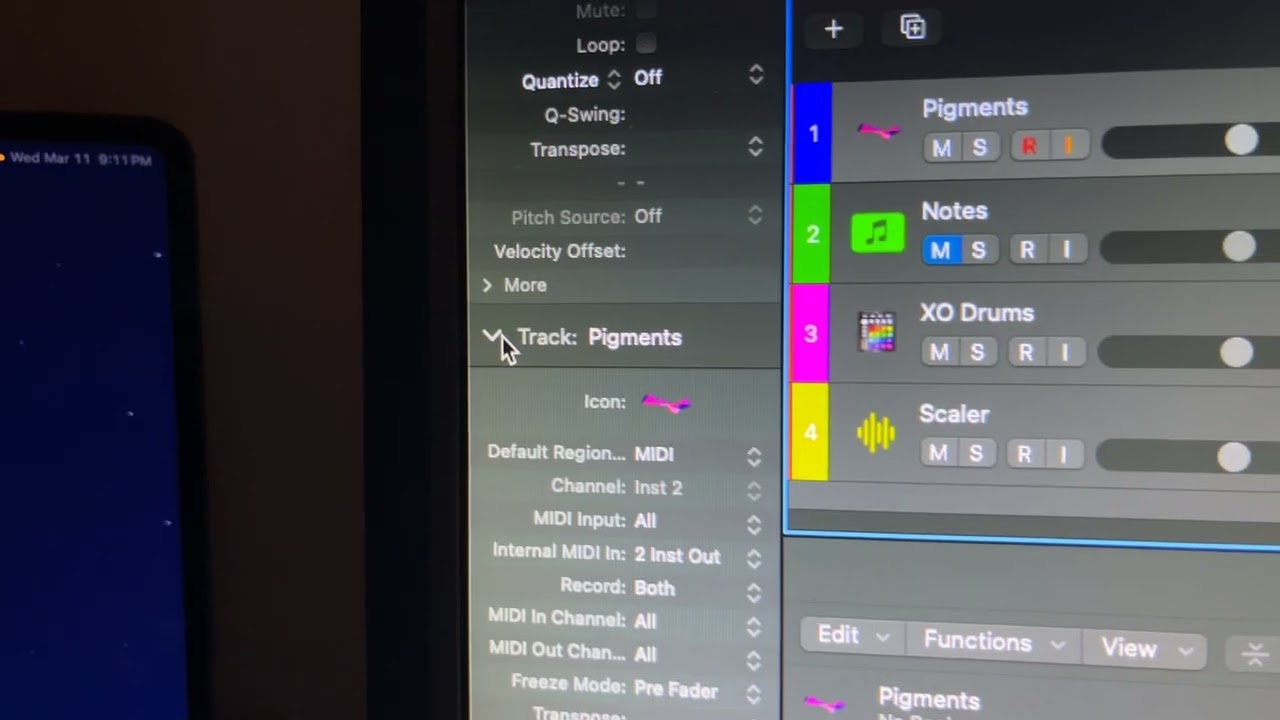
@sourcreembeat It does work in logic Pro, just figured it out! Check out this video demo. Very similar to what was shown in the video from @Julia

3 Likes

Hey @IC3MANE thanks for making this video! So it is very similar setup to Live, that’s great :folded_hands:

Crazy…everyone here tried to figure it, we ask Claude, we read forums…no answer until now.

@IC3MANE Video is great…did you ever think of doing youtube shorts with tips and listing them?

1 Like

Anyone having luck w this in Bitwig? I’m receiving midi from Notes and it is playing my device on a separate track, but none of the midi data is being recorded. Feels like I’m just missing some obvious step

2 Likes

Hi IC3MANE, First of all, Thank you for sharing tips with midi out in Logic Pro.

I am running Logic Pro 12 and your tips works sometimes but not every time.

“And above all, the Transform MIDI Out feature is a function that FAW added as part of NOTES, but in reality, your tip is utilizing Logic Pro’s own built-in functionality. Your tip is certainly very useful. However, the feature that FAW claims to have added to the plugin is, in fact, not working at all. Unless I use Ableton, it is simply not usable in Logic Pro — that is the truth.

For example, simple strumming works in most cases. However, when testing arpeggio or arpeggio combined with reverse playback, the first chord is almost always ignored as the MIDI recording proceeds. What’s even stranger is that when Omnisphere 3 is inserted as the virtual instrument on the track receiving the MIDI recording, after the recording ends and Internal MIDI In is turned back off, playback fails entirely — requiring the creation of a new track, or the use of a Logic Pro stock instrument or a different virtual instrument.

Of course, this issue is resolved if Omnisphere is not used, but as someone who actively wants to utilize Omnisphere 3, this is an extremely important problem for me.

Furthermore, now that Transform MIDI Out has been adopted as an official feature, I believe FAW should be providing solutions through their official YouTube channel rather than leaving users to figure it out this way. When I asked a question on a brief tutorial video that had already been uploaded to their official channel, they implied that content covering the MIDI Out functionality I was looking for would also be uploaded — yet there has been no response whatsoever to this day.

This issue cannot be considered resolved in any way, and it is a problem that FAW absolutely must address.” @Julia @Gavin_FAW

1 Like